import cv2
import numpy as np
import matplotlib.pyplot as plt
img_file = "credit_card.png"
tem_file = "reference.png"
img = cv2.imread(img_file)
tem = cv2.imread(tem_file)
def tem_process(img):
img_cpy = img.copy()
gray = cv2.cvtColor(img,cv2.COLOR_BGR2GRAY)
ret,binary = cv2.threshold(gray,10,255,cv2.THRESH_BINARY_INV)
contours,hierarchy = cv2.findContours(binary.copy(),cv2.RETR_EXTERNAL,cv2.CHAIN_APPROX_SIMPLE)
temp_index_list = {}
digits_template = {}
for i,contour in enumerate(contours):
x,y,w,h=cv2.boundingRect(contour)
temp_index_list[x] = {'i':i,'pos':(x,y,w,h)}
keys = list(temp_index_list.keys())
keys.sort()
for i,k in enumerate(keys):
contour = temp_index_list[k].get("pos")
x,y,w,h = contour
digits_template[i] = cv2.resize(binary[y:y+h,x:x+w],(57,88))
return digits_template
digits = tem_process(tem)
rectKernel = cv2.getStructuringElement(cv2.MORPH_RECT, (9, 3))
sqKernel = cv2.getStructuringElement(cv2.MORPH_RECT, (5, 5))
image = cv2.resize(img,(300,int(img.shape[0]*(300/img.shape[1])),))
gray = cv2.cvtColor(image, cv2.COLOR_BGR2GRAY)
tophat = cv2.morphologyEx(gray, cv2.MORPH_TOPHAT, rectKernel)
gradX = cv2.Sobel(tophat, ddepth=cv2.CV_32F, dx=1, dy=0,ksize=-1)
gradX = np.absolute(gradX)
(minVal, maxVal) = (np.min(gradX), np.max(gradX))
gradX = (255 * ((gradX - minVal) / (maxVal - minVal)))
gradX = gradX.astype("uint8")
gradX = cv2.morphologyEx(gradX, cv2.MORPH_CLOSE, rectKernel)
thresh = cv2.threshold(gradX, 0, 255, cv2.THRESH_BINARY | cv2.THRESH_OTSU)[1]
thresh = cv2.morphologyEx(thresh, cv2.MORPH_CLOSE, sqKernel)
threshCnts, hierarchy = cv2.findContours(thresh.copy(), cv2.RETR_EXTERNAL,cv2.CHAIN_APPROX_SIMPLE)
cnts = threshCnts
cur_img = image.copy()
cv2.drawContours(cur_img,cnts,-1,(0,0,255),3)
locs = []
concour_img = image.copy()
for (i, c) in enumerate(cnts):
(x, y, w, h) = cv2.boundingRect(c)
ar = w / float(h)
if ar > 2.5 and ar < 4.0:
if (w > 40 and w < 55) and (h > 10 and h < 20):
locs.append((x, y, w, h))
cv2.rectangle(concour_img,(x,y),(x+w,y+h),(255,0,0))
locs = sorted(locs, key=lambda x:x[0])
output = []
for (i, (gX, gY, gW, gH)) in enumerate(locs):
groupOutput = []
group = gray[gY - 5:gY + gH + 5, gX - 5:gX + gW + 5]
group = cv2.threshold(group, 0, 255,
cv2.THRESH_BINARY | cv2.THRESH_OTSU)[1]
digitCnts,hierarchy = cv2.findContours(group.copy(), cv2.RETR_EXTERNAL, cv2.CHAIN_APPROX_SIMPLE)
digits_x=[]
for c in digitCnts:
(x, y, w, h) = cv2.boundingRect(c)
digits_x.append(x)
indexs = np.argsort(digits_x)
c_digits = [digitCnts[c] for c in indexs]
for c in c_digits:
(x, y, w, h) = cv2.boundingRect(c)
roi = group[y:y + h, x:x + w]
roi = cv2.resize(roi, (57, 88))
scores = []
for (digit, digitROI) in digits.items():
result = cv2.matchTemplate(roi, digitROI,
cv2.TM_CCOEFF)
(_, score, _, _) = cv2.minMaxLoc(result)
scores.append(score)
groupOutput.append(str(np.argmax(scores)))
cv2.rectangle(image, (gX - 5, gY - 5),
(gX + gW + 5, gY + gH + 5), (0, 0, 255), 1)
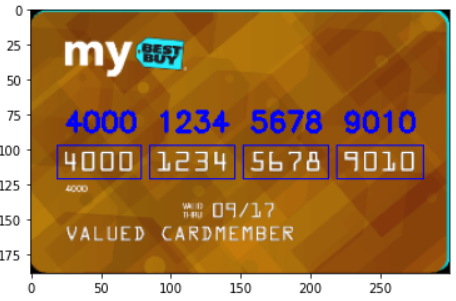
cv2.putText(image, "".join(groupOutput), (gX, gY - 15),
cv2.FONT_HERSHEY_SIMPLEX, 0.65, (0, 0, 255), 2)
output.extend(groupOutput)
print("Credit Card #: {}".format("".join(output)))
plt.imshow(image)
|